10:12 PM
Blog pinger, i thing all blogger know it. Blog pinger or Pinger tool is such application made to help poeple notify search enggine that her/his blog has been updated. ping is an XML-RPC-based push mechanism by which a weblog notifies a server that its content has been updated, i dont know how it's work exactly but some issues that I believe using ping tools can help you to make your blog have a good visibility in search engine. Here is 2 of most powerfull ping tools (in my opinion) which referenced by my friend that i usually use to ping some of my blog
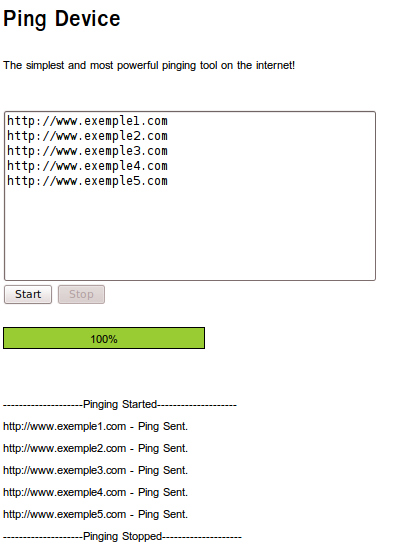
Ping device have a simple view, but trust me it's give you advantages more than it's looks. ping device can perform mass ping and give simple report how far the system has worked, just fill the url in the text area then click start.
 |
| pingdevice.com screenshoot |
Same as tool above, using ping farm you can not only perform mass ping as usual but also perform blog pinging through RSS URL.
 |
| pingfarm.com screenshoot |
there are many website that offer blog ping service with farious function and advantages, do not get confused which is best don't lose focus cause your content is everything.
» read more....
7:59 PM
Hi there, today we (ubuntubuzz) wanna share an excellent premium theme for your wordpress blog. This theme is specifically made by ubuntubuzz team which modified from default wordpress theme 'jenny'. This Green, Simple and Elegant Theme is suitable for your blog which usually using a clean and simple themes view, This themes named 'Green theme ' which is taken from our favorite color Green, here's the screenshot from the demo page.
 |
| Green wordpress themes |
The Green Theme has a lot of option provided, you can customize and add some social information there, thus template properties provided :- Customable Widget in the left and bottom of page.
- Dynamic featured image slider.
- Featured video dan popular post (*controlable by theme option on the admin page).
- Google adsense ready, you can embed adsense advertisment on the top and bottom of the post.
- Easy to Insert google analytics code.
- Social network and bookmarking sharing botton in the bottom of the post.
- etc
The picture above illustrated 'the Green Theme' theme option on the admin page, you can find easily this page at the time you finish the installation. |
| Green wordpress themes admin |
|
Finally you can test by your self, give us feedback so that we can provide a better wordpress template another day. Demo Page : Wordpress Green Theme
Download : http://www.mediafire.com/?iuhc9rp9jg2qycs
Enjoy a free Premium Wordpress Theme by ubuntubuzz.
» read more....
2:02 PM
FBlogger in draft special version of Blogger where the Blogger development team try out the new features before they release them to everyone, to access google in draft you can go to http://draft.blogger.com/, if you already have blogspot account or blog you can make this (draft.blogger.com) to your default dashboard. Blogger already have beautifful change based on google in draft and it's review, see what different from it's old version of Blogger.
Blogger Stat, Built-in blog statistics made blog monitoring as easy as Google Analytics Blogger stat is one of the the new feature of Blogger, Blogger Stat is built-in blogger tools for monitoring blog statistics and track your blog traffic, if you wanna start using this feature Just go to Blogger in Draft, and you'll notice a new "Stats" tab. You don't have to install or configure anything to start benefitting from Stats.
 |
| Blogger Stat of traffic inbound |
 |
| Blogger Stat show mount of visitor |
Better Way to Posting Article- As we see in blogger in draft, blogger has made a little change in how to compose a blog posting, blogger add some fancy tools which made way of blog posting easier, as we can see in blogger post editor toolbar there is one tools added namely 'translate'. I used to use google translate to help me to translating from english to indonesian or opposite, now i can little bit faster to search a strange vocabulary :p
 |
| New view of blogger in draft post editor toolbar |
|
|
- Provide new way and view of insert picture utillity, google in draft serve new way of inserting picture in a posting. We can picture directly from Harddrive, Url, and Picasa (using account) complate with picture preview, with this utillity we can also inserting old picture we have been upload in the same blog before.
 |
| New way of inserting picture |
- Google in draft has complate it's change by add geographic location in a bottom of blogger posting editor, just click and type the location you want google will include the map in your posting.
 |
| Blogger in draft add geographic location |
Better Post Preview
Blogger in draft provide a better Post preview than the old ones, On the New Post page, click on the Preview button (this is a new button that we’ve just added), and you will see a new window open with the WYSIWYG preview of the post. This is how your blog post will appear to your readers when you hit publish, with the same format and style of your current Blogger theme.
» read more....