Red Hat Mobile App

1:45 PM

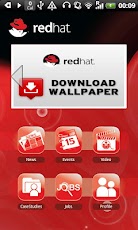
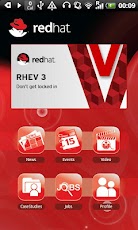
Red Hat Asia Pacific Pte Limited - mobile application. News, events, video, blogs, case studies delivered to your handset.

Featuring server-side configuration and content managed in a simple Drupal web site, hosted on a free Red Hat Openshift Express server.

Developed by Gary Marshall for Red Hat Asia Pacific.

If you use an Android phone, you can download it and give it a try.


What's in this version:
  1. Added Red Hat wallpaper download
  2. Added a Jobs section
  3. Expanded sharing via social media to include sharing via
  4. Facebook
  5. Twitter
  6. Email
  7. Improved profile screens to facilitate expanded social media integration.
  8. Many other improvements - too many to mention!
You can download the Redhat application from Google Play Android Store.


0 comments

» read more....

Linux kernel 3.3 released with Android support

6:52 PM

The latest release of the Linux kernel 3.3, is now available, this is the second release of the kernel in 2012 which brings with it the long-awaited merging of code from Google's Android project.

This is what particularly interesting to developers looking to boot Android or run apps on the stock Linux kernel and represents a resolution to the issues that kept the two apart for so long it's not the only new feature included. However optimized power management and other infrastructure that didn't make it this time will arrive in the next release that is 3.4

For a long time, code from the Android project has not been merged back to the Linux repositories due to disagreement between developers from both projects” the Linux 3.3 release notes state. 
“Fortunately, after several years the differences are being ironed out. Various Android subsystems and features have already been merged, and more will follow in the future. This will make things easier for everybody, including the Android mod community, or Linux distros that want to support Android programs.”
Also made into the release are improvements to file systems like Btrfs, memory management, networking, security and much, much more.

0 comments

» read more....

Boot to Gecko (B2G) : An Open Web of infinite possibilities for Mobile Devices

2:52 AM

Mozilla Foundation today officially announced the launch of its new Mobile OS platform called Boot to Gecko (B2G). For all those who want to know how B2G is different from other Mobile Operating Systems such as Android or iOS, B2G is the Chrome OS of the mobile world and is ofcourse open source. Mozilla called its new in-house wonder  "Web as the Platform for the mobile devices". B2G will be able to run any web application just like Chrome OS, so if you are a web developer and already developing web apps you don't need to do anything new, your app will be ready to run on B2G as soon as B2G is in the market.

Web Developers just need to write a small web app manifest for the app to be installed on your homescreen, just like you do it for Google Chrome Browser and Chrome OS for your web app to be download-able from Google Chrome web store. 

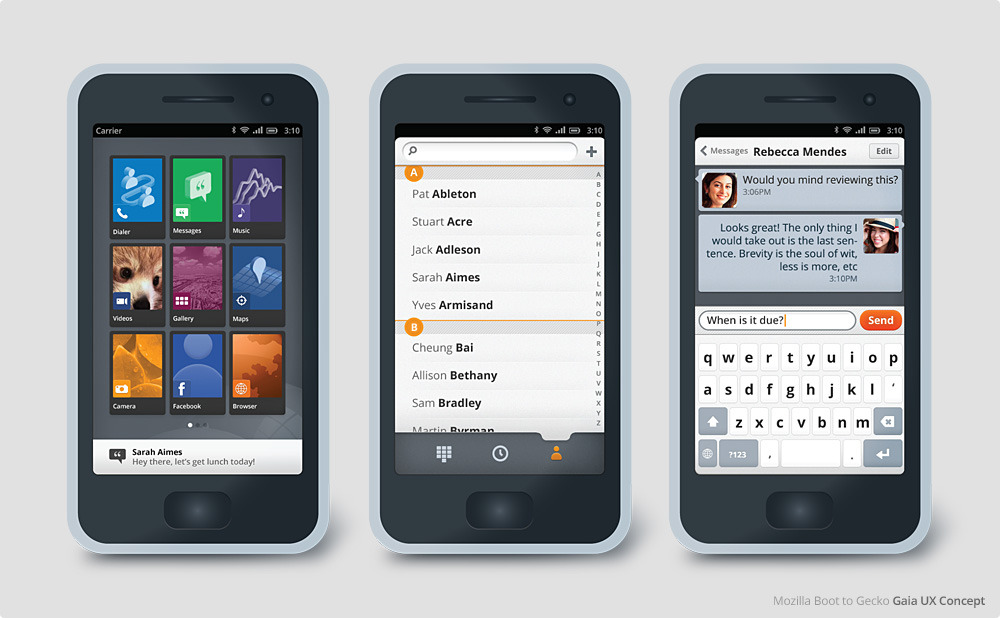
Another distinctive feature apart from Web as a Platform is the UX called Gaia. It is so open that a user can have a look at the underlying HTML source code of a web app at the press of a hardware button and hack it for personal customization.

What makes Gaia extra interesting is that it is all developed in HTML5, CSS and JavaScript. Gaia code is available on GitHub and one can just check it right now to test or contribute.

Gaia is designed to demonstrate the functionality, reliability and creative potential of the open web as a mobile platform.

The following is a quick visual tour of Gaia, and what it means


Here is a Video demonstration of B2G prototype.


Mozilla also clarified that it has avoided using any major Android components to duck any future patent trolls or licensing issues. Mozilla also managed to strike an alliance with Telefonica and Qualcomm to deliver very low cost phones to users worldwide.

Looks like Android and iOS gonna face tough competition coming days :)

0 comments

» read more....

Cotton Candy: Ubuntu powered World's Smallest PC

1:57 AM

Technology is getting more and more smarter and portable to use, Cotton Candy is one more example of such a useful device which makes technology, easy to carry and affordable to manage for everybody.

The Cotton Candy is a product of FXI Technologies, Norway, it is a USB stick sized computer device which allows users a single, secure point of access to all personal cloud services and apps through their favorite operating systems, while delivering a consistent experience on any screen.  The device will serve as a companion to smart phones, tablets, and notebook PC especially Macs, add smart capabilities to existing displays, TVs, set top boxes and other media that supports USB mass storage.


Cotton Candy is powered by a ARM® Cortex™-A9 1.2GHz Processor, 1 GB DRAM, support up to 64 GB of local storage capacity through microSD, Wifi and Bluetooth connectivity and will run on both Ubuntu and Android operating systems with a support for virtualization for Windows, Linux and Mac.

A USB and HDMI 1.3 connector are on hand to connect the Cotton Candy to your screen, and the little PC can play HD video, show various picture file formats and if you choose Android, run all the usual apps from the Android Market. The Bluetooth connection lets you use a wireless keyboard and mouse too.

Cotton Candy is soon to be released and currently available on pre-orders with a price tag of $199 or £139.

0 comments

» read more....

Three reasons why Ubuntu for Android would be a big boost for high performance sales teams

2:41 AM

Most of the high performance sales teams today are equipped with both Smart Phones and Laptops for their computing requirements both on the move and at the office. Sometime sales people carry a Tablet to reduce the need for both Smart Phones and a Laptop. But Tablets are more costly and not a complete replacement for both Mobile Phone or a Laptop/Desktop.

For sales teams with lesser budgets on their sides, sales professionals need to depend only on their office desktop or on a smart phone alone, with a small screen and no keyboard for typing long emails and proposals.

Ubuntu for Android is now the answer to all these problems, a full fledged productivity desktop with the power of smart phone. Here are three reasons why Ubuntu for Android would be a big boost for high performance sales teams.

Cost: Sales teams keep traveling from place to place both in the city and outside city. On the move carrying a bulky laptop is always troublesome and not always required, thanks to smart phones most of the office work such as checking and replying email, editing documents is a much easier affair than opening a laptop and finding a proper place to work.
With Ubuntu for Android companies are only required to purchase a Smart Phones for their sales professional instead of both Laptop and a smart phone, or only a Laptop (including the cost of Software and AMCs) complimented by a dumb phone. In the office 4-5 docking terminals would be enough for a team of 10 sales guys. Thus decreasing the overall computing cost substantially.
Portability: As we know, sales teams keep on moving and not all sales professionals are present in the office at the same time. On the move sales professionals can work through smart phones, can dock it to a Multimedia Projector on the client side for presentation and back in the office same phone can be docked as a desktop without any need of data transfer from here and there. Ubuntu for Android will thus provide both physical and data portability.
Enterprise Ready: Ubuntu is already a enterprise proven platform for businesses across the world. And by taking the advantage of desktop virtualization, the same smart phone can be used as a thin client with the familiar desktop applications such as MS Office etc. or the CRM application on the cloud. Reducing the need for trainings to work on Linux desktop.

Ubuntu for Android is surely a game changer for both Hardware and Software domains, with the introduction of Ubuntu for Android in enterprise and consumer market prices of dual core smart phones will decrease substantially as compared to both Laptops and Tablets, and companies would also save millions they spend on software for each hardware they procure. Professionals such as sales people will also work efficiently both on the move and at the office with physical & data portability and familiar enterprise ready applications.

0 comments

» read more....

Unofficial VLC Build for Android Ready to Test

6:15 AM

Our favorite media player VLC now comes to Android. But, before you jump into this post, please make note that VLC for Android is unofficial build (compiled from source) of VLC compiled by adridu59 @xda-developers. It means that this application has no support from VLC team, so when you encounter any bug, don't go to VLC team for reporting, please join this discussion to do so.


Unofficial VLC Build from Android features:
  • Built using latest android SDK & NDK
  • Gingerbread & ICS support
  • Hardware acceleration support [Buggy]
  • Headset detection
  • Almost all media formats should be working (DTS/MPEG2/Theora still WIP)

There are three build variants for this release:
  • ARMv6/ARM11
  • ARMv7a/Cortex-A8/NEON
  • ARMv7a/Cortex-A9
If you are interested in testing VLC for Android, please click here to download and join the discussion. Use with your own risk!

Regards :)

0 comments

» read more....

Linux Kernel 3.3 Will Let You Boot Into Android

10:47 PM

With the release of Linux Kernel 3.3 you will be able to boot into Android userspace without any modifications (to the kernel) but not with very good power management, The 3.4 kernel release will hopefully have the power management hooks that Android needs in it, along with a few other minor missing infrastructure pieces that didn't make it into the 3.3 kernel release."

Revealed Greg-KH who recently joined The Linux Foundation after quitting from Novell SUSE.

This puts Android right there with Gnome and KDE as just another desktop environment for GNU/Linux.

Things getting interesting day by day in open source world.

Source : muktware

0 comments

» read more....

Ubuntu for Android Is much more than what we thought about it

3:58 PM


In a recently release video demo of Ubuntu for Android from canonical, Ubuntu for Android looks even more promising than a converged Mobile Phone and a Desktop PC.

It can also be transformed to the Ubuntu TV once docked to a TV through HDMI port. So your Smart Phone is not only a full fledged desktop inside your pocket but a Media center too.

Here is the Video demo of the Ubuntu for Android concept.


Mark Shuttleworth also confirmed on his blog that Ubuntu for Android is not the Ubuntu Phone announced last year in October and is a separate project altogether. 

0 comments

» read more....

Ubuntu for Android: Convergence of Mobile Phone with Desktop PC

3:06 AM

Ubuntu for Android! Well this could be a the next game changer for both Mobile Phones and PC market, latest of the innovations which could change the way we do our computing, at a time when Mobiles and Tablets are out numbering the sales of Desktops and Laptops. And it seems that desktop would be dormant and obsolete in few years fighting and competing with Mobile Phones and Tablets.

Even thought the concept is not much different from Motorola Aetrix 4G docking Phone, but if your smartphone can boot with the Ubuntu on a desktop we can expect much more.

Ubuntu for Android is the beginning of  the convergence of  Mobile devices and Desktop PCs in a real sense. Something, I would call a Personal Thin Client, though not a thin client in a real sense.

In simple terms Ubuntu for Android is a full Ubuntu desktop, on a docked Android phone. In terms of Hardware requirements, your Android phone should be equipped with a dual core processor.

Ubuntu for Android provides a full desktop experience, including office software, web browsing, email and media applications, on Android phones docked to a screen and keyboard. Thanks to tight integration with the Android service layer, the transition between the two environments is seamless, making it easy to access the phone's services from the desktop when docked.

With Ubuntu on Android you can enjoy full featured Web Browsing with your favorite desktop browser with your smartphone but on a much larger screen real estate. Ubuntu for Android also integrates data access such as contacts, messaging, calender & making calls etc., in both Phone and Desktop modes.

Currently, Ubuntu for Android is only a prototype and Just like recently announced Ubuntu for TV, Manufacturers and interested parties are being encouraged to speak to Canonical if wanting to take advantage/learn more about the technology.

0 comments

» read more....

AirDroid: Access Your Android Phone From Ubuntu Linux

1:54 PM

Android is one of many successful Linux innovations in the market. Built from versatile Linux kernel, Android phones are widely used nowadays and give freedom for its users and developers for creating many excellent applications such as AirDroid. AirDroid is a free application which lets you control and manage your Android devices wirelessly via web browser. Via web browser, huh? Yes, you can use many functions of Android devices from any operating system including Ubuntu. All you need is Android phone and a computer with a web browser in it.


OK! Let's jump into the river! First, install AirDroid to your Android device from Android Market. Once installed, go to the app and set the web (ip) address and port, also the password to connect then press Start to activate the service.


Once service have started, open your web browser and type the web (ip) address you've set on AirDroid application. You need to enter the password to connect.


Done! Once connected, you can do a lot of stuff there such as:
Files
Transfer files between Android devices and computers.
Cut, copy, paste, search, rename or delete files on the SD card.
SMS
Read, send, forward or delete SMS messages.
Applications
Install, uninstall, backup, search apps and do batch processing.
Photos
Preview, delete, import, export, set as wallpaper and photos slide show from desktop.
Clipboard
Share clipboard text between desktop and device.
Contacts
Group, search, create contacts, check and delete call logs.
Ringtones
Search, preview, import, export, delete and customize ringtones for phone calls, notifications and alarms.
Music
Play, search, import, export, delete, or set as phone call, notification and alarm ringtones.


For additional information, below is the AirDroid features walk through video:


via: MakeTechEasier

0 comments

» read more....

How to Fix Angry Birds Error in Chrome

7:14 PM

Angry Birds is a puzzle video game developed by Rovio Mobile. Inspired primarily by a sketch of stylized wingless birds, the game was first released for Apple's iOS in December 2009, Now Angry Birds can be played in Android, Windows, and Google Chrome.

Running Angry Birds on Ubuntu
There is a good news (is not a new news) that ubuntu user now can play the most rocketed game that is not `Angry Birds`, moments ago chrome provide Angry birds to list of Chrome Game that ready to install and the other good news is it can be played offline.
Angry Birds Screenshot
Angry Birds Chrome Error
The Angry Birds which run in chrome actually made could be played offline, but sometimes users get an ERROR message "You are running the latest offline capable version"  yes this error message is `ERROR` which I mean in the title of article.
Chrome Cookies and Other Data storage
Fixing Angry Birds Chrome Error
if we see the message above, surely you will stop there :), a simply way to fix it is `deleting a local cache` however your game progress will lost and you must play Angry Birds from the beginning again. Do following step to fix Error above  :
  • Go to Preferences -> Under The Hood -> Content Settings -> All Cookies and Site Data.
  • Find a cache from chrome.angrybirds.com
  • Select it, you'll find some options, choose "local cache" and delete it.
  • Start Angry Birds

0 comments

» read more....

Fast and easy Tutorial, Step by step Upgrade Nexian Journey to Android 2.2 (Froyo) on Ubuntu Desktop

9:03 AM

Is it possible Nexian Journey went smoothly using the Android 2.2 Froyo. The answer is a smooth victory, perhaps in wonder why the local product is smooth jaya using Android 2.2 I, personally maybe because the hardware support that qualified so Froyo can run smoothly. 
Nexian Journey
Features the latest in a human face on android Froyo enjoy using this local product without significant obstacles, one of the interesting features is the support for busybox, this feature can be used to run the operating system in one Froyo android operating system can run is ubuntu desktop.
Quadrant test results even addressing a significant increase from the version that just got eclairs 460 points, and using Froyo get test results Quadran 960 points. screenshot is below. But I felt lack of use Android 2.2 on Nexian Journey Battery endurance is a problem of wasteful use Eclair berberda with the rather more efficient use of power in the battery. Having some way to brain tweaking green robot Nexian Journey in ubuntu, now turn to upgrade the system Android 1.3 Android 2.2 Froyo Eclair to using Ubuntu. Munkin upgadrade method Froyo on Nexian journey has been much discussed on blogs devoted to mengoprek Nexian Journey using the window-based applications but this time I will mebahas bahaimana how to upgrade using the Ubuntu operating system. Upgrde Nexian Journey to Froyo using 2 ways fastboot Mode and Stand Alone Mode (Installation using the sdcard), so to fastboot mode can use in my previous writings that discuss using fastboot Mode using Ubuntu. Step by step that must filled is to prepare some important files to upgrade to Froyo. The following files are required in the downloaded file :
  1. File recovery Froyo: Recovery Clockwork.img
  2. File Application Google: GoogleApps.zip
  3. ROM Froyo CynogenMod 1.6.2: CynogenMod-1.6.2-stable-version
There is Step by Step to Upgrade Nexian Journey to Android Froyo

  • The first step download the file to the end and make sure nothing is corrupted
  • Then make sure Nexian Journey detected fine on Ubuntu systems, how to install the driver you can find easily by uncle google.. :D
  • After installation is complete drivers continued to use the method fastboot.
  • Turn off your mobile phones, then go in fastboot Mode by pressing the [Hang up (red button)] + [Volume Down] + [Power] simultaneously.
  • After entering the mode fastboot proceed, enter recovery Clockwork Froyo into the recovery partition as follows:
  • Move Recovery Clockwork.img into one directory or folder contained fastboot file that you saved. eg in your home directory, your Ubuntu Open Terminal and then type the following command in fastboot modes:
. / fastboot flash recovery recovery-Clockwork-z71.img
  • When you have finished entering clockwork.img into Android partition then restart the fastboot mode by typing the command:
. / fastboot reboot
  • Then the phone will go in Normal Mode Android (Android is still in the previous version), in this mode ROM Froyo proceed to copy files and Google Apps.zip CynogemMod.zip into sdcard directory (copy the file in the directory / sdcard not in another directory)
  • After the file copy process is complete turn off your cell phone, and off batrey to menggilangkan cache files are left behind.
  • Replace the batrey and turn the phone and then enter the Recovery Mode by pressing the [Power] + [Volume Down] + [Camera] simultaneously, recovery mode menu will look like the following picture:
    Android Recovery Mode
  • Use the volume up / down to select the menu and press the trackball to choose the selected menu.
  • Step hereinafter select the Choose Zip From the menu and then select the file sdcard-1.6.2-ROM CynogenMod update.zip proceed to choose the menu to install, wait until the installation is finished CynogenMod ROM (installation not more than 8 minutes depending on the speed of the R / W sdcard)
  • After installation is complete CynogenMod ROM, repeat the steps above to to install GooogleApps.zip
  • Wait until the installation is complete GoogleApps, then go back into recovery mode main menu, select menu wipe data / factory reset to format the data in internal memory
  • Wipe process is completed and then restart your phone by selecting menu reboot the system now
  • Mobile will be the live re-wait some time to appear spalsh CynogenMod logo. process takes 5 minutes
  • Wait until the entry of Android Normal mode, that meaning the upgrade to the Android 2.2 Froyo is complete.

0 comments

» read more....