Chrome OS now a Desktop Operating System

2:13 AM

We all know that Chrome OS from Google is a Linux based operating system with Google chrome browser as a operating system. But things are now changing and Chrome OS is moving from a browser only operating system to a more traditional operating system with a full fledged Window Manger called Aura, a shell and a File manager.

The browser as operating system is apparently not working out for Google. I mean, have you ever thought of ditching your favorite operating system in favor of a browser only Chrome OS? Or purchasing a Chrome Book for that matter ?

Google seems to acknowledge that, and has just pushed out a pretty significant update to the Dev channel, which basically turns Chrome OS into a desktop operating system. The Aura window manager and shell adds a desktop, overlapping windows, a taskbar, and is fully hardware accelerated with fancy transitions and all that.


Aura is a hardware-accelerated "user interface framework for Chrome UI" that offers "rich visuals, large-scale animated transitions and effects that can be produced only with the assistance of hardware acceleration". Aura is cross-platform and should "provide the foundation of a flexible windowing system and shell for Chrome and ChromeOS on a variety of form factors".

The latest Chrome OS release is only available for Samsung and Acer Chromebooks as Cr-48 Chromebooks will skip Chrome 19.

0 comments

» read more....

Canonical introduces Metal-as-a-Service tool for microservers

4:15 PM

Canonical has unveiled a Metal-as-a-Service (MaaS) offering to provision and manage high-density Ubuntu microservers running hyper-scale computing centres and clouds.

Canonical claimed MaaS would allow administrators to set up and allocate thousands of tightly packed racks to different groups of users, adding the latest software without IT teams needing to physically visit each machine. MaaS will debut with the Ubuntu 12.04 Beta 2 and is scheduled to drop with Ubuntu 12.04 LTS, due on 26 April.

According to Mark Shuttleworth, MAAS was born to bring Ubuntu's attribute (speed, agility, etc) into "the physical world for hyperscale deployments".

MaaS extends Canonical's JuJu dev-ops software for setting up a cloud by adding the capacity to remotely manage, provision and allocate hardware servers. MaaS allows admins to automate firmware updates, burn and test, and also download and test cloud-based applications without need for virtualisation.

The idea is that though MaaS and Ubuntu it becomes easier to manage and deploy a growing number of high-density racks based on ARM and Intel's Atom in a burgeoning category of microserver computing.


Canonical is hoping MaaS will help Ubuntu consolidate its presence against Red Hat Linux and RHEL derivatives such as CentOS as the choice for running clouds. Virtualisation is one popular way to allocate server capacity to different apps and groups of users, by partitioning the physical machine's hard drive. The idea of MaaS, however, is that you get a whole server – not a subset of a server.

The source code is available from Canonical's Launchpad project hosting service. MAAS is planned for inclusion in Ubuntu 12.04, an upcoming long-term support release that will arrive at the end of the month.

0 comments

» read more....

Anonymous OS: Ubuntu based "malicious" OS pulled down amid panic

8:51 PM

Earlier this week, someone created a Tumblr webpage for a new operating system called “Anonymous-OS Live.”. However Soon after the operating system became available, the @AnonOps a Twitter account that is believed to speak for Anonymous posted a message saying it was fake and "wrapped in trojans" but despite the warnings, more than 26,000 people still downloaded it.

The creators of the OS denied it was infected with viruses arguing,


In our world, in Linux and opensource world, there are no viruses.

And If any user  believe that Anonymous-OSis wrapped in trojans” or “backdoored OS by any Law enforcement Company or Hacker” please don’t download it!

But don’t mislead the world that Linux is dangerous and has trojans!

You could download it as a torrent and via direct download, but as of today, only the former option. SourceForge pulled it down.

The 1.36 GB download is based on Ubuntu - one of the most popular versions of the Linux operating system. With Mate Desktop Environment and is pre-loaded with lots of website sniffing and security tools. The software's creators say they put it together for "education purposes to checking the security of web pages".  They also warn not to use any of the tools “to destroy any web page” because doing say may make mean you “end up in jail because is a crime in most countries!”

Here are few of the Screenshots of Anonymous OS  as posted on the tumbler page.


Downloading Anonymous OS

The Official Direct Download link from Sourceforge is however taken down earlier this morning but the Anonymous OS is available for download from torrents available here. Adventurous users can download and make a bootable CD/USB image of the Live iso using unetbootin tool. However it is not recommended to download and use it, keeping the warnings from top security companies in mind.


0 comments

» read more....

Boot to Gecko (B2G) : An Open Web of infinite possibilities for Mobile Devices

2:52 AM

Mozilla Foundation today officially announced the launch of its new Mobile OS platform called Boot to Gecko (B2G). For all those who want to know how B2G is different from other Mobile Operating Systems such as Android or iOS, B2G is the Chrome OS of the mobile world and is ofcourse open source. Mozilla called its new in-house wonder  "Web as the Platform for the mobile devices". B2G will be able to run any web application just like Chrome OS, so if you are a web developer and already developing web apps you don't need to do anything new, your app will be ready to run on B2G as soon as B2G is in the market.

Web Developers just need to write a small web app manifest for the app to be installed on your homescreen, just like you do it for Google Chrome Browser and Chrome OS for your web app to be download-able from Google Chrome web store. 

Another distinctive feature apart from Web as a Platform is the UX called Gaia. It is so open that a user can have a look at the underlying HTML source code of a web app at the press of a hardware button and hack it for personal customization.

What makes Gaia extra interesting is that it is all developed in HTML5, CSS and JavaScript. Gaia code is available on GitHub and one can just check it right now to test or contribute.

Gaia is designed to demonstrate the functionality, reliability and creative potential of the open web as a mobile platform.

The following is a quick visual tour of Gaia, and what it means


Here is a Video demonstration of B2G prototype.


Mozilla also clarified that it has avoided using any major Android components to duck any future patent trolls or licensing issues. Mozilla also managed to strike an alliance with Telefonica and Qualcomm to deliver very low cost phones to users worldwide.

Looks like Android and iOS gonna face tough competition coming days :)

0 comments

» read more....

Linux Kernel 3.3 Will Let You Boot Into Android

10:47 PM

With the release of Linux Kernel 3.3 you will be able to boot into Android userspace without any modifications (to the kernel) but not with very good power management, The 3.4 kernel release will hopefully have the power management hooks that Android needs in it, along with a few other minor missing infrastructure pieces that didn't make it into the 3.3 kernel release."

Revealed Greg-KH who recently joined The Linux Foundation after quitting from Novell SUSE.

This puts Android right there with Gnome and KDE as just another desktop environment for GNU/Linux.

Things getting interesting day by day in open source world.

Source : muktware

0 comments

» read more....

Ubuntu for Android Is much more than what we thought about it

3:58 PM


In a recently release video demo of Ubuntu for Android from canonical, Ubuntu for Android looks even more promising than a converged Mobile Phone and a Desktop PC.

It can also be transformed to the Ubuntu TV once docked to a TV through HDMI port. So your Smart Phone is not only a full fledged desktop inside your pocket but a Media center too.

Here is the Video demo of the Ubuntu for Android concept.


Mark Shuttleworth also confirmed on his blog that Ubuntu for Android is not the Ubuntu Phone announced last year in October and is a separate project altogether. 

0 comments

» read more....

Ubuntu for Android: Convergence of Mobile Phone with Desktop PC

3:06 AM

Ubuntu for Android! Well this could be a the next game changer for both Mobile Phones and PC market, latest of the innovations which could change the way we do our computing, at a time when Mobiles and Tablets are out numbering the sales of Desktops and Laptops. And it seems that desktop would be dormant and obsolete in few years fighting and competing with Mobile Phones and Tablets.

Even thought the concept is not much different from Motorola Aetrix 4G docking Phone, but if your smartphone can boot with the Ubuntu on a desktop we can expect much more.

Ubuntu for Android is the beginning of  the convergence of  Mobile devices and Desktop PCs in a real sense. Something, I would call a Personal Thin Client, though not a thin client in a real sense.

In simple terms Ubuntu for Android is a full Ubuntu desktop, on a docked Android phone. In terms of Hardware requirements, your Android phone should be equipped with a dual core processor.

Ubuntu for Android provides a full desktop experience, including office software, web browsing, email and media applications, on Android phones docked to a screen and keyboard. Thanks to tight integration with the Android service layer, the transition between the two environments is seamless, making it easy to access the phone's services from the desktop when docked.

With Ubuntu on Android you can enjoy full featured Web Browsing with your favorite desktop browser with your smartphone but on a much larger screen real estate. Ubuntu for Android also integrates data access such as contacts, messaging, calender & making calls etc., in both Phone and Desktop modes.

Currently, Ubuntu for Android is only a prototype and Just like recently announced Ubuntu for TV, Manufacturers and interested parties are being encouraged to speak to Canonical if wanting to take advantage/learn more about the technology.

0 comments

» read more....

LibreOffice 3.5 Released

9:18 PM


Document Foundation has announced today the release of its next major roll out of LibreOffice suite, version 3.5, calling it as "The best free office suite ever".


The new version boast to include many new improvements such as,


Installing LibreOffice 3.5 in Ubuntu

Careful users can wait for LibreOffice PPA to be updated and install the latest version through ubuntu update manager, while power and curious  users can download the latest version and install it right now using the following method.
  • $ sudo apt-get remove libreoffice-core
Extract the downloaded archive and change to the DEBS directory containing the .deb installers. Issue the following command at the terminal
  • $ sudo dpkg -i *.deb
Now change to the "desktop-integration" sub-directory in the DEBS 
  •  $ sudo dpkg -i *.deb
Enjoy!


0 comments

» read more....

Ubuntu Business Desktop Remix

10:24 PM

Ubuntu Business Desktop Remix is a starting point for large-scale corporate desktop deployments. It is inspired by a review of common changes made by IT departments deploying Ubuntu at scale.


Ubuntu Business Desktop Remix is the newest enterprise ready spin of Ubuntu announced today by Mark Shuttleworth on his website.

Ubuntu Business Desktop Remix is built with enterprise oriented software such as VMWare, OpenJDk, Adobe Flash and getting rid with unnecessary software such as games, file sharing and social networking apps like Gwibber etc. The first release of Ubuntu Business Desktop Remix is based on 11.10 Onieric Ocelot. 


Ubuntu Business Desktop Remix is created for the purpose of Evaluation in Enterprise and Institutes. 

According to Mark Shuttleworth,

"This remix takes the most common changes we’ve observed among institutional users and bundles them into one CD which can be installed directly or used as a basis for further customization. Before anyone gets all worked up and conspiratorial: everything in the remix is available from the standard Software Centre.  Packages out, packages in. No secret sauce for customers only; we’re not creating a RHEL, we already have an enterprise-quality release cadence called LTS and we like it just the way it is. This is a convenience for anyone who wants it. Having a common starting point, or booting straight into a business-oriented image makes it easier for institutional users to evaluate Ubuntu Desktop for their specific needs."

Download of the remix image requires registration (because of EULAs). For more information head over to ubuntu.com/business/desktop/remix 

0 comments

» read more....

Laptops/Desktops/Servers That Ready for Ubuntu - Ubuntu Hardware Certification

8:00 PM

To ensure that Ubuntu runs smoothly in every laptops/desktops/servers, canonical has a program called Ubuntu Certification. Ubuntu certification is a program where ubuntu is working together with several laptops/desktops/servers and hardware providers to make sure that Ubuntu can work well on some product they produce.

Official Ubuntu (community) conducted some tests on every laptops/desktops/servers using predetermined testing and validation criteria before a servers/desktops/laptops or hardware awarded as 'Ubuntu Certified'. Some laptops/desktops/servers providers who have cooperated with ubuntu including Dell, Wipro, Lenovo, HP, IBM, Acer, Asus, Toshiba, System76, Intel, HCL Infosystems Limited, Citrix Systems, VMware, Sun, and Quanta.

List of  laptops/desktops/servers which have been certified by ubuntu can be seen here, at glance dell laptop series dominating the total of laptops that have been certified by Ubuntu.

So, if you've a plan to buy some new device (servers/desktops/laptops) and wondered if "can ubuntu works well there ?" , i think it is better idea if visiting this page first.

Besides of the project above, there are also Ubuntu community called Ubuntu Friendly which driven hardware validation programme for desktops, netbooks and laptops which running Ubuntu 11.10 and up, The aim of this community is to have a simple and quick way to look up how well machines work with Ubuntu releases. Ubuntu friendly now running in beta and planned to be  launch in April 2012. you can also participate in there, see following participation guide  or visit Ubuntu Friendly site

Reference site :
[1] http://www.ubuntu.com/certification
[2] https://friendly.ubuntu.com
[3] http://webapps.ubuntu.com/partners/certified-software/

0 comments

» read more....

Ubuntu TV : Just TV. No wires. No boxes.

10:45 AM

Ubuntu TV project is a new project from Canonical (Ubuntu) which inspired by a Smart TV, Canonical comes with a passion to provide a fully entertainment to user and enter the Smart TV market without any costs and complexities, Ubuntu TV combine a broadcast, time shift, online box office, personal cloud, apps and disk media experiences in one package.

The Ubuntu TV is planned to initially target in the US and China (will changed if there is a deal with local content provider) and is said it will be available by the end of 2012. Google and Apple, who are expected to unveil prominent TV products this year, apparently Cononical will compate with Google and Apple to unveil prominent TV products this year.

Ubuntu TV Architecture
at a glance, the interface is not much different from Ubuntu current release (Unity interface), The layered architecture of Ubuntu TV is Hardware -> Ubuntu Core (Linux Kernel) ->  Applications -> Lenses -> Scopes ->Unity.

Ubuntu TV Architecture
Ubuntu One Packed in Ubuntu TV
Ubuntu One will built-in to the Ubuntu TV, so you can connect to your photos and videos that saved in your personal cloud.

Ubuntu TV Features And Advantages
Taken from its official site, Ubuntu TV contain of some features as follows :
  • The official ‘Ubuntu TV’ site lists a features to be found in the OS.
  • Easy integration of broadcast, online services and applications
  • Modern broadcast TV experience – search , watch, record and play
  • Millions of movies and TV shows streamed over the web on demand
  • Shared-screen experience with iOS, Android and Ubuntu devices
  • Pause on one device, resume on another
  • Ubuntu One integration
  • App framework
More closely to Ubuntu TV
This screenshoot and video may give you brief visualization of Ubuntu Tv (screenshoot and video taken from ubuntu.com). 

Get Closer with Ubuntu TV

Ubuntu TV Guide

Search and play your favorite

Ubuntu TV Specification
Here are Hardware specification of Ubuntu TV taken from its official:
  • Support for ARM and x86 boards1
  • Local storage support for DVR functionality2
  • Minimum disk space: 2GB
  • Minimum memory: 1GB
  • Minimum video memory: 512 MB
  • HDMI
  • CEC support
  • Digital audio out
  • Hardware accelerated video capable of displaying content at 1080p3
  • Network connectivity: Gigabit Ethernet & Wireless b/g/n
  • USB host support
  • Bluetooth HCI interface
  • Modular tuner for broadcast TV (Satellite, Cable, Terrestrial)
Felt interested or want to involved inside Ubuntu TV, Visit http://www.ubuntu.com/tv.

0 comments

» read more....

BlankOn Panel Over Ubuntu - a new experience of menu/application launcher

8:43 AM

Blankon is one of popular ubuntu based distribution that developed by Indonesian Linux Mover Foundation and BlankOn developer team. In their latest release, Blankon (Blankon 7 code name Pattimura) bring something difference that called BlankOn panel.

BlankOn panel is a default application launcher in BlankOn, unlike some alternative menu launcher (MGSE, Mate, Cinnamon, etc) which concentrate its appearance so closed to Gnome 2 look, BlankOn panel give a completely different looks but it's great! see following screenshot.

BlankOn Panel over Ubuntu
BlankOn Panel in Action

Install BlankOn Panel in Ubuntu
Actually, I want to try this a long time ago, but just realized at this time. Before we can install it in ubuntu, we should add following repository to your package list (/etc/apt/source.list).
  • Add BlankOn Repositories
deb http://kambing.ui.ac.id/blankon pattimura main restricted extras extras-restricted
deb-src http://kambing.ui.ac.id/blankon pattimura main restricted extras extras-restricted

deb http://kambing.ui.ac.id/blankon pattimura-security main restricted extras extras-restricted
deb-src http://kambing.ui.ac.id/blankon pattimura-security main restricted extras extras-restricted

deb http://kambing.ui.ac.id/blankon pattimura-updates main restricted extras extras-restricted
deb-src http://kambing.ui.ac.id/blankon pattimura-updates main restricted extras extras-restricted
  • apt-get update - so the repository added completely to your system
  • apt-get install blankon-panel

Running BlankOn Panel in Ubuntu
You can try run BlankOn panel via terminal, by type `blankon-panel`, see the ubuntu logo at the top left corner of your desktop (in a line with gnome panel) there's a way to BlankOn panel.

Once i run it, it was look not so neat, because it's dualism menu with unity launcher and sometimes blankon panel button also overlap with Global Menu so there make it does not visible, but yeah! it was not designed for Ubuntu.
Ubuntu Global Menu

to make it looks more tidy, you can remove the global menu through following:
  • sudo apt-get remove appmenu-gtk3 appmenu-gtk appmenu-qt
  • sudo reboot
if you want to reinstall it do as follows :
  • sudo apt-get install appmenu-gtk3 appmenu-gtk appmenu-qt
  • reboot
if you intend to use it permanently, you can add blankon-panel in your startup application list or even install BlankOn in your desktop.
BlankOn Panel in Startup Application list
You can visit this links to know much about blankOn and BlankOn Panel.

0 comments

» read more....

10 Reason Why Ubuntu Still Great !

1:55 PM

Happy New Year All !

In the start 2012, some people may start their day with writing their resolution, some people may lay down on their bed because of tired after partying, and some of them maybe start their day with reinstalling their PC with new OS. if you including in the third option i think you are geek... :p
 
2012 is a momentum to switch to ubuntu, after doing such many thing with ubuntu and feel confort with it, i thing now people should use it as prime OS. Ubuntu is not a perfect yet but still great, there are 10 reason why ubuntu still great and worth to try :
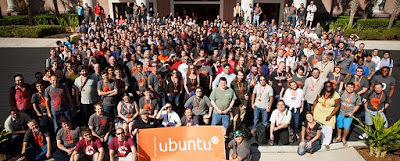
Ubuntu Developer Summit

1. Ubuntu is Legal
Ubuntu is Open Source OS, Using Ubuntu means your free to download/copy, redistribute, and modified without breaking any license which usually applied to proprietary software. even though using open source is not mean you are free to do everything, there are a lot of thing you can do in Open source than proprietary software.

2. Ubuntu is Still Free
Ubuntu is still free till now. at first many proprietary software comes from Open Source (Redhat, OpenOffice, etc) but then they decide to be closed because was acquired by a large company. Until this day, canonical make ubuntu still free to use for you, even though no more free ubuntu CDs to redistributed from shipit.ubuntu.com.

3. You Free to choice
Ubuntu having many variations and derivatives, start from Kubuntu, Xubuntu, Edubuntu, Linux Mint, BlankOn, and many more. Each of them have different appearance but use a same core, you are free to choice which ubuntu do you like to use.

4. Ubuntu is Customizable
Ubuntu is composed of thousand supporting application, each application in ubuntu can be easily to installed, re-installed, upgraded, and modified accordance to your desire through Ubuntu Software Center, only with Internet connection you can find thousand application that ready to install without worrying any technical knowledge.  
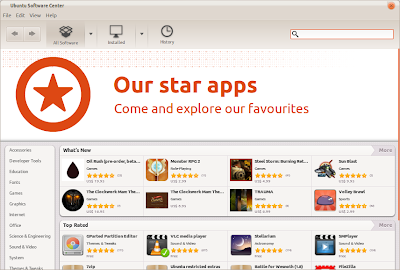
Ubuntu Software Center

5. Ubuntu Always Updated
Ubuntu official (through ubuntu developer) fixing bugs and launch new version of application  every day, every changes in ubuntu/ubuntu application which have been made always informed to user via ubuntu update manager which lauch default every your computer boot up. Users also easily update the latest version of ubuntu/ubuntu application from software center.
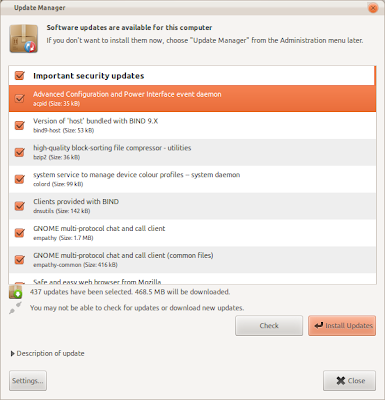
Ubuntu Update Manager
 6. Having Good Support from Official and Community
Based on my experience, ubuntu is the best linux distro that giving support to their user. Official Ubuntu website and million unofficial ubuntu blog and forum are ready to answer a questions and giving help if you are having any difficulties of using ubuntu.
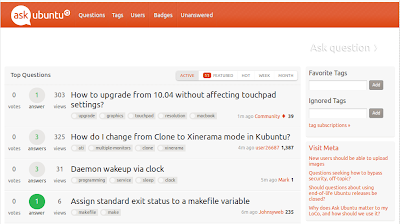
askubuntu.com

7. Ubuntu is Beautifull
Ubuntu have an artwork team which always update ubuntu look every 6 month (ubuntu release twice a year), not only that, there are million ubuntu supporter on the net (deviantart, gnome look, etc) which ready to share their desktop appearance with you.
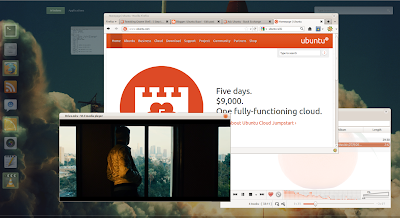
Screenshot Ubuntu Desktop

8. Ubuntu is Fast, don't worry about old computers
Ubuntu have relatively fast booting and almost run on every PC including old computer, latest ubuntu release does not necessarily require the latest hardware as well. if you feel your computer is running a little bit slowly in Ubuntu just uninstall or drop greedy memory consuming application.


9. Ubuntu is Linux Distro which Most Widely Used
For now ubuntu is not popular distro anymore (regarding to distrowatch) replace with Linux Mint, but you need to know that Linux Mint is an Ubuntu derivative so if you are using Linux Mint it's mean that you are using ubuntu. Most application in Linux Mint you can also use in Ubuntu and so otherwise.

10. Viruses is Far away
Ubuntu/Linux generally still safe from Virus, this not mean that there are no viruses on linux but it's very rare and still save from it.

Taking of Ubuntu is taking about the power of community. Even though is it not a perfect yet, but ubuntu still the greatest, so when will you try ?

0 comments

» read more....

KDE 4.8 Preview (Sneak Peak)

10:16 AM

Yesterday, KDE has release the first Release Candidate (KDE 4.8 RC 1) for its renewed Workspaces, Applications, and Development Platform. KDE 4.8 which is scheduled to be release in January 2012 you can peek the appearance here.

Taken from the announcement here, KDE 4.8 RC 1 is contain a hundred of bugs fix since its Beta. One of new features in KDE 4.8 is a 'Secret Service', KSecretService is an application which provide shared password storage that help a user to save their password (optionally) and share it with other application, I have not tried this application but (guess) seems similar to Ubuntu password keyring.

Some notable feature in KDE 4.8 are :

  • Qt Quick in Plasma Workspaces -- Qt Quick is making its way into the Plasma Workspaces, the new Plasma Components provide a standardized API implementation of widgets with native Plasma Look and Feel. The device notifier widget has been ported to using these components and is now written in pure QML. KWin's window switcher is now also QML-based, paving the way for newly designed window switchers.
  • Use Dolphin2, file view has been rewritten for better performance, scalability and more attractive visual appearance.
  • KSecretService optionally enables a shared password storage, therefore making your saved passwords available to many other applications, leading to a more secure system and better integration of non-KDE apps into the Plasma Workspaces and KDE apps into non-Plasma workspaces.
  • More ..

KDE 4.8 Preview Video
This video is taken from youtube which uploaded by devSantyago (KDE 4.8 git compilation / 2011-11-07)  

Bugs can be reported, verified and found at bugs.kde.org. We will update this news with the new post by the time KDE 4.8 Stable already release or it's available to install via PPA. 

0 comments

» read more....

Ubuntu 12.04 Alpha 1

8:53 PM

Right on Ubuntu 12.04 release schedule, yesterday (Dec 1st, 2011) the development team has release Ubuntu 12.04 Alpha 1, Ubuntu Alpha scheduled to be released twice (Alpha 1 and 2) before the Ubuntu 12.04 beta which will be released in March 1st, 2012.

Ubuntu 12.04 Alpha 1 Application
Ubuntu 12.04 Alpha 1 comes with Linux kernel 3.2, some default application has been changed and some of them has removed. Among the software packages bundled with Precise Pangolin Alpha 1 are :

  • Firefox 9 BETA
  • Thunderbird 9 BETA
  • Ubuntu Software Center 5.1.2
  • Gedit 3.2.3
  • Gwibber 3.3.1
  • Onboard 0.96
  • Rhythmbox   
  • LibreOffice 3.4.4
For now Banshee, Tomboy and gbrainy have been removed, there is no certainty whether it will be included in next release or not.

Download Ubuntu 12.04 Alpha 1 CD ISO / DVD Images
Now Ubuntu 12.04 Alpha 1 available for download, although alpha version is not recommended to install because of security and stability reasons you can still download and install it in your PC. download Ubuntu 12.04 Alpha 1 ISO through following link.


0 comments

» read more....

Linux Mint 12 Released - Download and Install Now

6:31 PM

Linux Mint 12 Lisa released, since yesterday it's no longer 'RC'. All the ease of Ubuntu has available there and cover with more attractive packaging.

Yesterday, Linux Mint 12 Lisa officially release and ready to download on their mirror page. Since distrowatch put them into the most popular linux today, Linux Mint getting recognized and liked by linux lovers as well as Ubuntu alternative.

Linux Mint 12 Code Name Lisa Screenshot
Here's some application and version you will get on Linux Mint 12, For complete information read folowing release notes.
  • Kernel 3.0
  • X.Org 7.6
  • GNOME 3.2
  • MGSE (Mint Gnome Shell Extensions)
  • Mozilla Firefox 8
  • Thunderbird 7
  • LibreOffice 3.4

Download Linux Mint 12 Lisa
Want to try it ?, download Linux Mint 12 'ISO' through following links, it's available on Gnome and Gnome + Mate (for both available in 32bit and 64 bit).

Check also :
you can also install Linux Mint 12 application over Ubuntu 11.10, read our previous post bellow :

0 comments

» read more....

Linux Mint 12 RC Review and Video

7:49 AM

Linux Mint is Linux Distribution that based on Ubuntu, Linux Mint 12 RC has been release along with the release of Ubuntu 11.10 Oneiric. So .. what's features inside ? .

Linux Mint 12 RC has been release. Linux Mint 12 was built based on Ubuntu 11.10 and Gnome 3.2, what changes inside and what's features which makes different from Ubuntu 11.10. Check following review :

Gnome 3.2 + MGSE
Different from Ubuntu 11.10 Oneiric, LInux mint come with Gnome 3.2 as default environment complated with Mint Gnome Shell Extensions (MGSE) which makes it feel not to leave its previous environment Gnome 2. MSGE is a desktop layer on top of Gnome 3 that makes it possible for you to use Gnome 3 in a traditional way. You can disable all components within MGSE to get a pure Gnome 3 experience, some features of MSGE are :

  • The bottom panel
  • The application menu
  • The window list
  • A task-centric desktop (i.e. you switch between windows, not applications)
  • Visible system tray icons
Mint Gnome Shell Extensions Menu
MATE
In this RC you will get two option of destop, that is Gnome 3.2 and Gnome 3.2 + Mate, Mate is a fork of Gnome 2 which is compatible with Gnome 3. Eventually, MATE will be in every way identical to Gnome 2 and represent the future of traditional desktops within Linux. See following video for Linux Mint 12 RC Gnome 3.2 + Mate :


a video above is taken from channel here
Themes and Artworks
Linux Mint 12 uses a new theme called Mint-Z which is based on Mint-X and Zukitwo, Linux Mint 12 also provide high quality of wallpapers which can be choosen on appearence setting.

Download Linux Mint 12 RC
Interested to try ?, you can download both CD's or DVD's through following links. for complate installation and application you should download the DVD.

Linux Mint 12 RC Review Video
Here Linux Mint 12 RC review video taken from youtube. 
 

a video above is taken from channel here
 
read also : Install Linux Mint application over Ubuntu 11.10

0 comments

» read more....

Linux Mint is More Popular than Ubuntu?

5:56 AM

Linux Mint is an Ubuntu-based distribution whose goal is to provide a more complete out-of-the-box experience by including browser plugins, media codecs, support for DVD playback, Java and other components. It also adds a custom desktop and menus, several unique configuration tools, and a web-based package installation interface. Linux Mint is compatible with Ubuntu software repositories. Although it is an "Ubuntu-based" distribution, Linux Mint have successfully beaten its predecessor, Ubuntu in popularity.


According to the DistroWatch average number of hits per day statistic, Linux Mint has 3464 hits per day for last 1 month, while Ubuntu has only 2706 hits per day. But, what is the matter causes Ubuntu lost its #1 popularity? Does the users dislike the newly Unity interface? Or there is something else?

When you are on top , there is only one way , down!

0 comments

» read more....

Create Google+ Pages for Brand, Website and Community

6:59 PM

Google has launched Google+ pages, now you can create a Google+ Pages for your community, website, brand, product, and Organization. Here step by step to create Google+ pages for your Community

Login to Google+
Before start creating Google+ pages, you must be registered in Google+. Start creating Google+ pages by log in to your Google+ Account.

Google+ login pages

Go to Here  
Fill some information (name of community, brand, product, url, organization) about pages which create.

Start creating Google+ pages

Customize your page's
your page will viewable by all user in Google+, give it the best description, give a tagline and change the profile photo

Customize Google+ pages

Finish and share in Circle
After finish creating the Google+ pages, you can share it in your circle and introduce your community in a web.

Google+ pages has been created

Now your page has created, you have a pages for your community, any posting you have made will be post there.


Now it's your turn to make a Google+ pages, don't forget to add our page in your circle : +ubuntubuzz

0 comments

» read more....

Google+ logo Changed ?

12:43 PM

Is Google+ logo changed ?

Today, when i was check in Google+, I see something different from before, the Google+ favicon has been changed, is this new Google+ logo, was you notice at this changes ?

Google+ new Logo ?

Please tell us if someone has information regarding this, I have google it but did not find any appropriate answers.

0 comments

» read more....