SUSE Studio: Build your own SUSE based Linux distro

10:31 PM

SUSE Studio is a free online Linux image creation service sponsored by Novell Inc. The company behind SUSE Enterprise Linux and Open SUSE Linux. With SUSE Studio you can develop your own SUSE based Linux OS, software appliance or virtual appliance, choosing which applications and packages they want on their "custom" Linux and create their own branding for it.

You can also choose between openSUSE, SUSE Linux Enterprise Server and SUSE Linux Enterprise Desktop bases for your custom builds, can choose GNOME, KDE and other desktop environments, The resulting build will be fully functional system with applications like Firefox, LibreOffice, and whatever apps they want.

Getting Started

Note: New and inexperienced users are advised to create their first custom build from the templates in SUSE gallery to avoid build problems due to dependency issues with selected packages. Below tutorial would be useful for both advance and new users to get started. Please also note that this article illustrates only essential steps required to create a custom build Linux and not all the aspects of SUSE Studio are covered in this tutorial.
Using SUSE Studio is very easy, what you need is just a browser and an Internet connection, you don't need to install any application on your system to create ISO files for your brand of custom Linux. Here is a short guide to get you started with SUSE Studio.

Open the website susestudio.com , it will open a welcome page, click on "sign in or create an account" you will be asked to login through your Novell, Google, Yahoo, Facebook, Twitter or Open ID accounts. If you don't have a Novell account Just choose any of the accounts such as google or facebook.


Just fill in your details and press "continue" to get started, you are now ready to start your own custom Linux distro.

Click on create you new appliance to start a new Project.


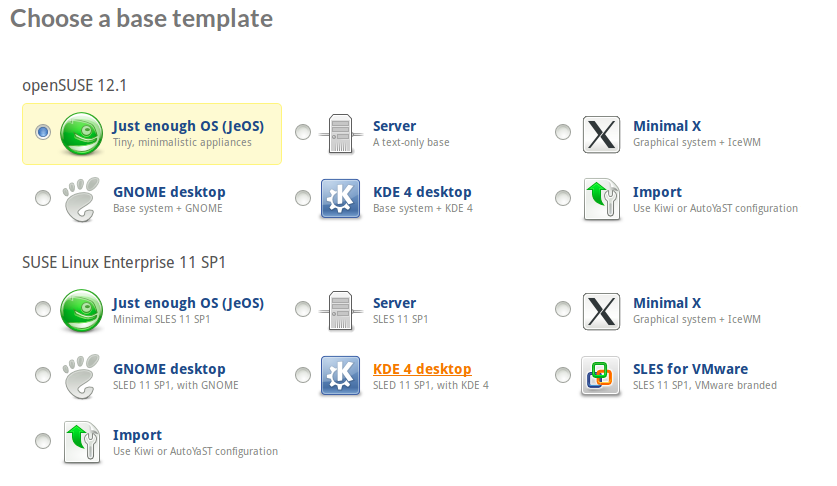
Choose a Template for your custom build, Choose the hardware architecture (32bit or 64bit) and give your Project a name, with which your custom build will be known to everybody,
Now you are ready to customize, rebrand and configure your new project,


Click on the software tab to select the packages and applications to be included in your custom build, you can add applications through repositories, upload your own RPM files , or even make a simple search in the SUSE repositories for the applications of your choice.


After choosing the applications, click on configuration tab, here you can customize Language, keyboard layout, time zone, network, firewall and user settings etc,. You can also personalize your custom build with your own logo and welcome screen background, select a default run level, add your own EULA (end user license agreement) add a custom script at boot time etc.


Now you are ready to build your first custom Linux or Software Appliance using SUSE Studio.

You can choose to create either a USB stick/hard disk image, Live CD/DVD, VMware/Virtual box, OVF virtual machine, hyper-v or Amazon EC2 image formats for your custom Linux/Appliance. Your Build may take some time depending on number of packages and will report any dependency issue or conflicts for any unmet dependencies at this step after you hit the Build button.

You can now either download the generated ISO image, or upload to Amazon EC2 and start using your own brand of Linux Desktop.


0 comments

» read more....

Linux from Scratch: A compelete Guide to build your custom Linux system from source code

10:45 PM

Bruce Dubbs has announced the release of an updated version of Linux From Scratch (LFS), version 7.1. Linux From Scratch is a book of instructions on how to compile a base Linux system from scratch, either from an existing Linux installation or a Linux live CD. It is intended primarily as an educational exercise for those wishing to get an understanding about how a Linux system works under the hood.

Updated packages in this release include Linux kernel 3.2.6, GCC 4.6.2, udev 181, e2fsprogs 1.42, zlib 1.2.6, Binutils 2.22, Coreutils 8.15 and Automake 1.11.3. Readers interested in following the book and building their own custom Linux distro can do so by viewing the latest version online or they can download the entire 345-page book in PDF or HTML formats.


Linux From Scratch (LFS) is a project that provides you with the steps necessary to build your own custom Linux system. There are a lot of reasons why somebody would want to install an LFS system. The question most people raise is "why go through all the hassle of manually installing a Linux system from scratch when you can just download an existing distribution like Debian or Redhat".

The most important reason for LFS's existence is teaching people how a Linux system works internally. Building an LFS system teaches you about all that makes Linux tick, how things work together, and depend on each other. And most importantly, how to customize it to your own taste and needs.

Source: Distrowatch.org

0 comments

» read more....

Remastersys: Create your own customized ubuntu derivative

9:24 PM

Ever wondered how you can create a backup of your Ubuntu Installation with all the applications you installed which you 've collected after reading articles like this on Internet along with your home folder with all your documents and user settings such as custom icons, themes, plymouth boot splash, grub splash screen etc.,? or how you can make a customized version of your Ubuntu installation with the applications you need and clone it to the other machines in your office, without doing all the downloads and add PPA stuff etc on every single machine ?, or redistribute your custom build to your friends who don't have high internet bandwidth to download all the application they need ? Or just flaunt your customized Linux Distro (with your name and customized branding) within your circle and become a cool geek ?

Then Remastersys is the tool you are searching for.
Remastersysis a tool that can be used to do 2 things with an existing Debian, Ubuntu or derivative installation.
  1. It can make a full system backup including personal data to a live cd or dvd that you can use anywhere and install.
  2. It can make a distributable copy you can share with friends.  This will not have any of your personal user data in it.
Currently there is a size limitation of 4GB imposed by the genisomage tool in Ubuntu and Debian. So you need to exclude the media files etc., from your back up to make space for the packages you need most.

Installation:
Remastersys is not available by default in Ubuntu apt repositories, you need to manually add the repositories in sources.list file.
  • $ sudo gedit /etc/apt/sources.list
now append the following lines in the sources.list file (as per your distribution)
For Gutsy and Earlier - up to version 2.0.11-1
# Remastersys
deb http://www.remastersys.com/repository remastersys/

For Hardy and Newer with original grub - version 2.0.12-1 and up
# Remastersys
deb http://www.remastersys.com/repository ubuntu/

For Karmic with grub2 - version 2.0.13-1 and up
# Remastersys
deb http://www.remastersys.com/repository karmic/

For Lucid and Newer - version 3.0.0-1
# Remastersys for Lucid and newer
deb http://www.remastersys.com/repository lucid/
For version 3.0.1-1 in versions Lucid or later you need to add the signed repositories.

As root, download and apply the repository gpg key.
wget -O - http://www.remastersys.com/ubuntu/remastersys.gpg.key | apt-key add -
then append the following in sources.list (according your distribution version)

#Remastersys Lucid
deb http://www.remastersys.com/ubuntu lucid main

#Remastersys Maverick
deb http://www.remastersys.com/ubuntu maverick main

#Remastersys Natty
deb http://www.remastersys.com/ubuntu natty main

#Remastersys Oneiric
deb http://www.remastersys.com/ubuntu oneiric main
 update the apt repositories
  • $ sudo apt-get update
Now you are ready to download and install Remastersys
  • $ sudo apt-get install remastersys

Using Remastersys: 


Following are the screenshots of Remastersys,


You can either choose to create a backup or a customized distribution, select a boot menu picture, boot menu picture for installed environment, custom plymouth theme and give it a cool name for your brand etc.,

Enjoy!


0 comments

» read more....