Linux from Scratch: A compelete Guide to build your custom Linux system from source code

10:45 PM

Bruce Dubbs has announced the release of an updated version of Linux From Scratch (LFS), version 7.1. Linux From Scratch is a book of instructions on how to compile a base Linux system from scratch, either from an existing Linux installation or a Linux live CD. It is intended primarily as an educational exercise for those wishing to get an understanding about how a Linux system works under the hood.

Updated packages in this release include Linux kernel 3.2.6, GCC 4.6.2, udev 181, e2fsprogs 1.42, zlib 1.2.6, Binutils 2.22, Coreutils 8.15 and Automake 1.11.3. Readers interested in following the book and building their own custom Linux distro can do so by viewing the latest version online or they can download the entire 345-page book in PDF or HTML formats.


Linux From Scratch (LFS) is a project that provides you with the steps necessary to build your own custom Linux system. There are a lot of reasons why somebody would want to install an LFS system. The question most people raise is "why go through all the hassle of manually installing a Linux system from scratch when you can just download an existing distribution like Debian or Redhat".

The most important reason for LFS's existence is teaching people how a Linux system works internally. Building an LFS system teaches you about all that makes Linux tick, how things work together, and depend on each other. And most importantly, how to customize it to your own taste and needs.

Source: Distrowatch.org

0 comments

» read more....

Remastersys: Create your own customized ubuntu derivative

9:24 PM

Ever wondered how you can create a backup of your Ubuntu Installation with all the applications you installed which you 've collected after reading articles like this on Internet along with your home folder with all your documents and user settings such as custom icons, themes, plymouth boot splash, grub splash screen etc.,? or how you can make a customized version of your Ubuntu installation with the applications you need and clone it to the other machines in your office, without doing all the downloads and add PPA stuff etc on every single machine ?, or redistribute your custom build to your friends who don't have high internet bandwidth to download all the application they need ? Or just flaunt your customized Linux Distro (with your name and customized branding) within your circle and become a cool geek ?

Then Remastersys is the tool you are searching for.
Remastersysis a tool that can be used to do 2 things with an existing Debian, Ubuntu or derivative installation.
  1. It can make a full system backup including personal data to a live cd or dvd that you can use anywhere and install.
  2. It can make a distributable copy you can share with friends.  This will not have any of your personal user data in it.
Currently there is a size limitation of 4GB imposed by the genisomage tool in Ubuntu and Debian. So you need to exclude the media files etc., from your back up to make space for the packages you need most.

Installation:
Remastersys is not available by default in Ubuntu apt repositories, you need to manually add the repositories in sources.list file.
  • $ sudo gedit /etc/apt/sources.list
now append the following lines in the sources.list file (as per your distribution)
For Gutsy and Earlier - up to version 2.0.11-1
# Remastersys
deb http://www.remastersys.com/repository remastersys/

For Hardy and Newer with original grub - version 2.0.12-1 and up
# Remastersys
deb http://www.remastersys.com/repository ubuntu/

For Karmic with grub2 - version 2.0.13-1 and up
# Remastersys
deb http://www.remastersys.com/repository karmic/

For Lucid and Newer - version 3.0.0-1
# Remastersys for Lucid and newer
deb http://www.remastersys.com/repository lucid/
For version 3.0.1-1 in versions Lucid or later you need to add the signed repositories.

As root, download and apply the repository gpg key.
wget -O - http://www.remastersys.com/ubuntu/remastersys.gpg.key | apt-key add -
then append the following in sources.list (according your distribution version)

#Remastersys Lucid
deb http://www.remastersys.com/ubuntu lucid main

#Remastersys Maverick
deb http://www.remastersys.com/ubuntu maverick main

#Remastersys Natty
deb http://www.remastersys.com/ubuntu natty main

#Remastersys Oneiric
deb http://www.remastersys.com/ubuntu oneiric main
 update the apt repositories
  • $ sudo apt-get update
Now you are ready to download and install Remastersys
  • $ sudo apt-get install remastersys

Using Remastersys: 


Following are the screenshots of Remastersys,


You can either choose to create a backup or a customized distribution, select a boot menu picture, boot menu picture for installed environment, custom plymouth theme and give it a cool name for your brand etc.,

Enjoy!


0 comments

» read more....

Ubunchu : Ubuntu Manga Series for Ubuntu and Manga Lovers

7:12 PM

Do you love reading manga (Comic) and love being Ubuntu user ?, here interesting news for you. It will become an interesting thing when we can combine two favorite hobbies into another hobby or being a new creation, maybe this is what lies behind Hiroshi Seo create an Ubunchu. “Ubunchu!” is a Japanese manga series featuring Ubuntu Linux. The outline of ubunchu is three school students in a system-admin club are getting into Ubuntu!

Ubunchu Manga for Human Being

Ubunchu is release under Creative commons license, even if its write in japan you can translate it into your language and re-released it under the Creative Commons BY-NC license. For now there are 8 chapter available for download, it's available in Japanese and international language:

Is anyone interested to create other similar works ?, we're wait for you creation guys..

0 comments

» read more....

Truth Happens : Redhat's legendary reply to Microsoft (Remixed)

2:27 AM

Here is the new remixed version of Redhat's legendary reply to the Microsoft's anti Linux campaign 'Get the Facts' in 2002. However later in 2009 Microsoft removed the campaign page from its website replacing it will a simple comparison between Windows and Linux.

The Video gives a walk-through of historical criticism on how throughout the history, new technology has been resisted by those who said it couldn't be done. Yet despite opposition, time and again the impossible is made possible by those with determination and vision.


Now the history has witnessed how open source is a better way, a better way of developing technology and a better way of making it accessible. And while there are those who have ignored open source or claimed it wouldn't work or wouldn't last, but at last truth happens.


The video ends with a quotation from Mahatma Gandhi

"First they ignore you...
Then they laugh at you...
Then they fight you...
Then you win... "

Hope you will enjoy the video :)

0 comments

» read more....
Track the trackers using Collusion Add-on for Firefox

2:08 PM

Mozilla has come up with the experimental Collusion add-on for Firefox, which lets users see all the third parties that are tracking your movements across the Web. Creating a new tab, Collusion displays an interconnected graph of sites the user has visited. It also shows the tracking sites which are using third-party cookies to track the user on those sites. Mozilla teamed up with the Ford Foundation to develop the Collusion add-on.


Interested users download the add-on directly from here. This add-on does not require a reboot for Firefox, To get started, click on the Collusion icon in the bottom-right corner of your browser. (You may need to show the Add-on Bar to see the icon.)


0 comments

» read more....

Boot to Gecko (B2G) : An Open Web of infinite possibilities for Mobile Devices

2:52 AM

Mozilla Foundation today officially announced the launch of its new Mobile OS platform called Boot to Gecko (B2G). For all those who want to know how B2G is different from other Mobile Operating Systems such as Android or iOS, B2G is the Chrome OS of the mobile world and is ofcourse open source. Mozilla called its new in-house wonder  "Web as the Platform for the mobile devices". B2G will be able to run any web application just like Chrome OS, so if you are a web developer and already developing web apps you don't need to do anything new, your app will be ready to run on B2G as soon as B2G is in the market.

Web Developers just need to write a small web app manifest for the app to be installed on your homescreen, just like you do it for Google Chrome Browser and Chrome OS for your web app to be download-able from Google Chrome web store. 

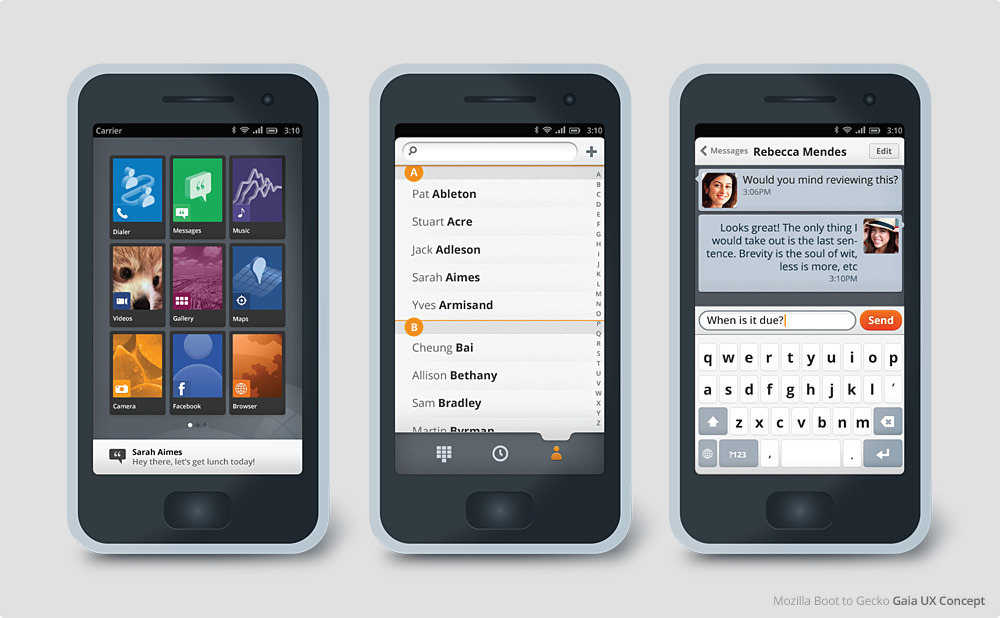
Another distinctive feature apart from Web as a Platform is the UX called Gaia. It is so open that a user can have a look at the underlying HTML source code of a web app at the press of a hardware button and hack it for personal customization.

What makes Gaia extra interesting is that it is all developed in HTML5, CSS and JavaScript. Gaia code is available on GitHub and one can just check it right now to test or contribute.

Gaia is designed to demonstrate the functionality, reliability and creative potential of the open web as a mobile platform.

The following is a quick visual tour of Gaia, and what it means


Here is a Video demonstration of B2G prototype.


Mozilla also clarified that it has avoided using any major Android components to duck any future patent trolls or licensing issues. Mozilla also managed to strike an alliance with Telefonica and Qualcomm to deliver very low cost phones to users worldwide.

Looks like Android and iOS gonna face tough competition coming days :)

0 comments

» read more....

Know Which Windows Application Works Well Using Wine (Wine AppDB)

12:28 PM


Some Ubuntu user sometimes have not been able to leave their old habits to use windows application, moreover if they are a gamers. Although there has many interesting games in Ubuntu, honestly windows game is more attractive and well maintained. Your decision to use Ubuntu as prime OS should not prevent you to play games, right ?.

Some of you may have already known Wine or also have used it , Wine is Linux application that let's to run windows application over Ubuntu, however not all windows program can be run properly but almost of them can work well with Wine. If you want to find out if some program can run using wine or not, we suggest you to visit Wine Application Database (AppDB).

Wine Application Database (AppDB)

Wine AppDB is a collection of program which have been officially or unofficially tested and confirmed work with Wine. Some application that display in Wine AppDB is submitted by registered user, they  testify what part is works and not works follows with distribution where its tested. If you get some programs do not run well in wine you can also find the instruction and solution in here.
Wine AppDB also classify application into Platinum, Gold, and Silver list, this classification is based on the level of success of wine in running application and number of users who rated them. here the list  

Platinum Application List
Applications which install and run flawlessly on an out-of-the-box Wine installation :
  • Final Fantasy XI Online Final Fantasy XI
  • StarCraft I
  • Guild Wars All Versions
  • Steam Official Release
  • Left 4 Dead Full (Steam)
  • Watchtower Library 2011
  • Counter-Strike
  • Warcraft III The Frozen Throne: 1.x
  • The Elder Scrolls IV: Oblivion 1.2.x
  • Bioshock 1.0
Gold Application List
Applications that work flawlessly with some special configuration :
  • Fallout 3 1.x
  • StarCraft II Retail
  • Supreme Commander SC 1.x.3xxx
  • Half-Life 2 Retail (32-bit)
  • Runes of Magic Official release
  • City of Heroes All Versions
  • Homeworld 2 1.x
  • Garena Garena Messenger (Beta)
  • Lord of the Rings Online Volume III
  • Dragon Age: Origins 1.x
  • Silver Application List
Silver Application List
Applications with minor issues that do not affect typical usage :
  • Warhammer Online Live
  • EVE Online 7.2x - Crucible
  • World of Warcraft 4.3.x
  • Team Fortress 2 Steam
  • Adobe Photoshop CS3 (10.0)
  • The Sims 3 All
  • Command & Conquer 3
  • Gothic 3 1.x
  • Adobe Flash CS3 Package 
  • MediaMonkey 3.0.6.1190
Apparently most of favorite applications above are games, is your favorite in the list above ?. Now you should consider to visit Wine AppDB before you decide to install (or even buy) some windows application, if you have any difficulties Wine AppDB also can be your problem solver.

0 comments

» read more....

LibreOffice 3.5.0 Now Can Be Installed via PPA

9:08 AM

The third major release of "the best free office suite ever" LibreOffice 3.5.0 now can be installed easily on Ubuntu via PPA. So, what's new in this release? Here are some of them.
LibreOffice Writer

  • a new built-in Grammar checker for English and several other languages
  • improved typographical features, for professional looking documents
  • an interactive word count window, which updates in real time
  • a new header, footer and page break user interface


LibreOffice Calc:
  • support for up to 10,000 sheets
  • a new multi-line input area
  • new Calc functions conforming to the ODF OpenFormula specifications
  • better performances when importing files from other office suites
  • multiple selections in autofilter
  • unlimited number of rules for conditional formatting
For further information about LibreOffice 3.5.0, please visit this page or you can download an infographic contains the new features and improvements here.

Install LibreOffice 3.5.0 on Ubuntu via PPA
Ubuntu users can install LibreOffice 3.5.0 by typing this command:
  • sudo add-apt-repository ppa:libreoffice/ppa
  • sudo apt-get update
  • sudo apt-get dist-upgrade
Please make sure you have removed OpenOffice (if any) to avoid any conflict.
  • sudo apt-get purge openoffice*
Desktop integration
If you want seamless integration for GNOME and KDE, you might want to install this package:
For GNOME
  • sudo apt-get install libreoffice-gnome
For KDE
  • sudo apt-get install libreoffice-kde

via: WebUpd8

0 comments

» read more....

Cotton Candy: Ubuntu powered World's Smallest PC

1:57 AM

Technology is getting more and more smarter and portable to use, Cotton Candy is one more example of such a useful device which makes technology, easy to carry and affordable to manage for everybody.

The Cotton Candy is a product of FXI Technologies, Norway, it is a USB stick sized computer device which allows users a single, secure point of access to all personal cloud services and apps through their favorite operating systems, while delivering a consistent experience on any screen.  The device will serve as a companion to smart phones, tablets, and notebook PC especially Macs, add smart capabilities to existing displays, TVs, set top boxes and other media that supports USB mass storage.


Cotton Candy is powered by a ARM® Cortex™-A9 1.2GHz Processor, 1 GB DRAM, support up to 64 GB of local storage capacity through microSD, Wifi and Bluetooth connectivity and will run on both Ubuntu and Android operating systems with a support for virtualization for Windows, Linux and Mac.

A USB and HDMI 1.3 connector are on hand to connect the Cotton Candy to your screen, and the little PC can play HD video, show various picture file formats and if you choose Android, run all the usual apps from the Android Market. The Bluetooth connection lets you use a wireless keyboard and mouse too.

Cotton Candy is soon to be released and currently available on pre-orders with a price tag of $199 or £139.

0 comments

» read more....

Free Ebook: The Linux Command Line

11:03 AM

Nowadays, most computer users are only familiar with the Graphical User Interface (GUI) and think that Command Line Interface (CLI) is an old-fashioned way to interact with computer. This is not true, because command line interface is expressive way to interact with computer, just like writing letter or message to our friends. It's been said that:

graphical user interfaces make easy tasks easy, while command line interfaces make difficult tasks possible

So, learning command line interface is important if you want to get the most out of Linux operating system. Linux command line is a great tool because we can perform a lot of tasks there. There are many references to learning command line interface. One of them is an eBook I'll post here.

This book is entitled "The Linux Command Line" written by William E. Shotts. This book contains 522 pages and divided into five parts:
Part 1: Introduction
Tells some story related with command line interface.

Part 2: Learning The Shell
Starts the exploration of the basic language of the command line including such things as the structure of commands, file system navigation, command line editing, and finding help and documentation for commands.

Part 3: Configuration And The Environment
Covers editing configuration files that control the computer's operation from the command line.

Part 4: Common Tasks And Essential Tools
Explores many of the ordinary tasks that are commonly performed from the command line. Unix-like operating systems, such as Linux, contain many “classic” command line programs that are used to perform powerful operations on data.

Part 5: Writing Shell Scripts
Introduces shell programming, an admittedly rudimentary, but easy to learn, technique for automating many common computing tasks. By learning shell programming, you will become familiar with concepts that can be applied to many other programming languages.

Well, if you want to learn Linux command line interface to get the most out of it, please download this book by clicking the below link:

Download eBook: The Linux Command Line

Regards :)

0 comments

» read more....

Three reasons why Ubuntu for Android would be a big boost for high performance sales teams

2:41 AM

Most of the high performance sales teams today are equipped with both Smart Phones and Laptops for their computing requirements both on the move and at the office. Sometime sales people carry a Tablet to reduce the need for both Smart Phones and a Laptop. But Tablets are more costly and not a complete replacement for both Mobile Phone or a Laptop/Desktop.

For sales teams with lesser budgets on their sides, sales professionals need to depend only on their office desktop or on a smart phone alone, with a small screen and no keyboard for typing long emails and proposals.

Ubuntu for Android is now the answer to all these problems, a full fledged productivity desktop with the power of smart phone. Here are three reasons why Ubuntu for Android would be a big boost for high performance sales teams.

Cost: Sales teams keep traveling from place to place both in the city and outside city. On the move carrying a bulky laptop is always troublesome and not always required, thanks to smart phones most of the office work such as checking and replying email, editing documents is a much easier affair than opening a laptop and finding a proper place to work.
With Ubuntu for Android companies are only required to purchase a Smart Phones for their sales professional instead of both Laptop and a smart phone, or only a Laptop (including the cost of Software and AMCs) complimented by a dumb phone. In the office 4-5 docking terminals would be enough for a team of 10 sales guys. Thus decreasing the overall computing cost substantially.
Portability: As we know, sales teams keep on moving and not all sales professionals are present in the office at the same time. On the move sales professionals can work through smart phones, can dock it to a Multimedia Projector on the client side for presentation and back in the office same phone can be docked as a desktop without any need of data transfer from here and there. Ubuntu for Android will thus provide both physical and data portability.
Enterprise Ready: Ubuntu is already a enterprise proven platform for businesses across the world. And by taking the advantage of desktop virtualization, the same smart phone can be used as a thin client with the familiar desktop applications such as MS Office etc. or the CRM application on the cloud. Reducing the need for trainings to work on Linux desktop.

Ubuntu for Android is surely a game changer for both Hardware and Software domains, with the introduction of Ubuntu for Android in enterprise and consumer market prices of dual core smart phones will decrease substantially as compared to both Laptops and Tablets, and companies would also save millions they spend on software for each hardware they procure. Professionals such as sales people will also work efficiently both on the move and at the office with physical & data portability and familiar enterprise ready applications.

0 comments

» read more....

Twidge: Twitter Client for Linux Terminal

9:30 PM


Twidge is a terminal client for microblogging sites such as Twitter and identi.ca.

Twidge is a full command-line client. It is designed to be useful when you’re sitting at a shell prompt. It produces output in well-formed and easily-parsed ways, and has various features for working with piped data.

There are other command line tools for twitter which are also available, but most of them are not updated for the changes in twitter security settings.
Here is how you can install and configure Twidge,

Twidge is available in the oneiric apt repositories, so if you are using Ubuntu 11.10 you just need to install Twidge using the install command.
  • $ sudo apt-get install twidge
But if you are using any other version of Ubuntu, you need to manually add the repositories for Twidge.
  • $ sudo gedit /etc/apt/sources.list
Append the following line at the end of the text,
deb http://ftp.de.debian.org/debian squeeze main
Save this repository to your sources.list to be able to download Twidge. In order to install from the command line, run:
  • $ sudo apt-get update 
  • $ sudo apt-get install twidge
Twidge Setup:

 Issue the following command in the terminal
  • $ twidge setup
Twidge Setup will generate a URL for the authentication (see the below image), copy the URL and paste it into your browser, it will ask you to login with your login credentials, just login and it will generate an authentication code.

Enter the authentication code in the terminal, and you are done and ready tweet the geek way :)


Some useful Twidge commands:

For the detailed description for the twidge commands look inside Twidge man pages.
  • $ man twidge
Or, you use lscommand to see the full list of commands at glance,
  • $ twidge lscommands
Here are some quick commands for day to day usage,

Status update:
  • $ twidge update
And then typing your 140 character update,

Check your @replies:
  • $ twidge lsreplies
Check most recent updates:
  •  $ twidge lsrecent


Lets tweet the geek style :)

0 comments

» read more....

Upgrade to Kernel 3.2 in Ubuntu 11.10 (oneiric ocelot)

5:37 PM

The Linux Foundation officially released the new Linux 3.2 kernel few days ago. The latest release comes with many improvements on the bugs and enhancement capabilities. Some important new features in the kernel 3.2 is support for ext4 block size larger than 4 KB to 1 MB, fixes Btrfs capabilities, additional support for setting the upper limit of CPU time by the process scheduler, automatic backup tree root and more.

Ubuntu 12.04 (Precise Pangolin) will have the kernel 3.2 by default, but if you still want to test the latest kernel in Ubuntu 11.10, here is how you can upgrade to the kernel 3.2 through PPA.

Warning: You are advised to make a backup of your system before proceeding ahead, we are not responsible for any data loss after kernel upgrade.
Installation of Kernel 3.2 in Ubuntu 11.10 via PPA:

  • $ sudo apt-add-repository ppa:francisbrwn9/kernels
  • $ sudo apt-get update 
  • $ sudo apt-get dist-upgrade
If  you want to revert the change and back to the previous kernel, you need to install PPA Purge.

  • $ sudo apt-get install ppa-purge
Then to remove the ppa,
  • $ sudo ppa-purge ppa:francisbrwn9/kernels

Note: The above instructions for Kernel upgrade will also work with Ubuntu derivative distros like Linux Mint, Sabily, Dream Studio, etc..

0 comments

» read more....

Unofficial VLC Build for Android Ready to Test

6:15 AM

Our favorite media player VLC now comes to Android. But, before you jump into this post, please make note that VLC for Android is unofficial build (compiled from source) of VLC compiled by adridu59 @xda-developers. It means that this application has no support from VLC team, so when you encounter any bug, don't go to VLC team for reporting, please join this discussion to do so.


Unofficial VLC Build from Android features:
  • Built using latest android SDK & NDK
  • Gingerbread & ICS support
  • Hardware acceleration support [Buggy]
  • Headset detection
  • Almost all media formats should be working (DTS/MPEG2/Theora still WIP)

There are three build variants for this release:
  • ARMv6/ARM11
  • ARMv7a/Cortex-A8/NEON
  • ARMv7a/Cortex-A9
If you are interested in testing VLC for Android, please click here to download and join the discussion. Use with your own risk!

Regards :)

0 comments

» read more....

Lightspark: Open Source Alternative to Adobe Flash Player

8:53 PM

Adobe has recently announced its plan to abandon Flash Player for Linux platform (through Netscape API to be specific) and limit it to Pepper API which is only available in Google Chrome. Thus leaving Firefox, Opera and other small browsers in doll drums.

It is a good time to look for Alternates, and Lightspark is one such alternate and is open source.

Lightspark, is  an LGPLv3 licensed Flash player and browser plugin written in C++/C that runs on Linux. Lightspark support Adobe’s newer Flash formats and AVM2 virtual machine.

The Lightspark player is completely portable. Lightspark has been successfully built on Ubuntu on PowerPC, x86, ARM and AMD64 architectures.

Installing Lightspark in Ubuntu:

For the latest version of lightspark, use the following PPA for Ubuntu 11.10 and 12.04:

  • $ sudo add-apt-repository ppa:sparkers/daily
  • $ sudo apt-get update
  • $ sudo apt-get install lightspark browser-plugin-lightspark

 Enjoy!

0 comments

» read more....

How to Clear Recent Used Document Log in Ubuntu

6:23 PM

Every Operating System (without no exception for Ubuntu) usually create user activity log that log in at the time, some log that are often found are recent used document, the presence of recently used document log sometimes makes people uncomfortable, they afraid if their friend know what they just did using their computer, it's about privacy.

You can perform many various ways to make Ubuntu does not showing any recently used document, here the easiest and fastest way to do it without installing extra application :

The list of recent used document is save in <home directory> /.local/share/recently-used.xbel, the fastest way to make you untraceable is delete the recently-used.xbel, do as follow :

  • rm ~/.local/share/recently-used.xbel
Create an empty file to replace the file that you just delete above :
  • touch ~/.local/share/recently-used.xbel
Make sure that recently-used.xbel can't be modified (immutable), some reference about immutable file can be read in here :
  • sudo chattr +i ~/.local/share/recently-used.xbel
Chattr is equal to attrib in windows, System or user can't edit, remove, or modify recently-used.xbel. To revoke last action and make the file editable, do as follow :
  • sudo chattr -i ~/.local/share/recently-used.xbel
Before
After
Clear Recent Used Document using Application
Another ways that you can do to clear recent used document is using a program, there are many program that help you to manage user privacy and log in Ubuntu  (we will discuss it later), Some  application that may help you to manage user activity log and privacy control are : 
  1. BleachBit.
  2. Activity Journal.
  3. Ubuntu Tweak.
  4. Activity Log Manager.
Hopefully this will help :)

0 comments

» read more....

Tranmission 2.50 Has Been Released, Installation Instructions Inside!

5:25 PM

Transmission is an open source BitTorrent client developed by many volunteers. It's designed to be easy, powerful and "just work" application. Nothing less from great and easy-to-use application, Tranmission is included by default in Ubuntu distribution for BitTorrent client application. Transmission has gained a new version 2.50 that brings many improvements and bug fixes:


All Platforms
  • Fix crash when adding some magnet links
  • Improved support for downloading webseeds with large files
  • Gracefully handle incorrectly-compressed data from webseed downloads
  • Fairer bandwidth distribution across connected peers
  • Use less CPU when calculating undownloaded portions of large torrents
  • Use the Selection Algorithm, rather than sorting, to select peer candidates
  • Use base-10 units when displaying bandwidth speed and disk space
  • If the OS has its own copy of natpmp, prefer it over our bundled version
  • Fix Fails-To-Build error on Solaris 10 from use of mkdtemp()
  • Fix Fails-To-Build error on FreeBSD from use of alloca()
  • Fix Fails-To-Build error when building without a C++ compiler for libuTP
For further information about this release, please visit this page.

Install Transmission 2.50 on Ubuntu
Ubuntu users including Ubuntu Oneiric and upcoming Ubuntu version Precise can instal Transmission 2.50 by adding it's PPA repository:
  • sudo add-apt-repository ppa:transmissionbt/ppa
  • sudo apt-get update
  • sudo apt-get install transmission
Once installed, Transmission 2.50 can be accessed from Internet section from the menu.

Regards :)

0 comments

» read more....

Linux Kernel 3.3 Will Let You Boot Into Android

10:47 PM

With the release of Linux Kernel 3.3 you will be able to boot into Android userspace without any modifications (to the kernel) but not with very good power management, The 3.4 kernel release will hopefully have the power management hooks that Android needs in it, along with a few other minor missing infrastructure pieces that didn't make it into the 3.3 kernel release."

Revealed Greg-KH who recently joined The Linux Foundation after quitting from Novell SUSE.

This puts Android right there with Gnome and KDE as just another desktop environment for GNU/Linux.

Things getting interesting day by day in open source world.

Source : muktware

0 comments

» read more....

Ubuntu for Android Is much more than what we thought about it

3:58 PM


In a recently release video demo of Ubuntu for Android from canonical, Ubuntu for Android looks even more promising than a converged Mobile Phone and a Desktop PC.

It can also be transformed to the Ubuntu TV once docked to a TV through HDMI port. So your Smart Phone is not only a full fledged desktop inside your pocket but a Media center too.

Here is the Video demo of the Ubuntu for Android concept.


Mark Shuttleworth also confirmed on his blog that Ubuntu for Android is not the Ubuntu Phone announced last year in October and is a separate project altogether. 

0 comments

» read more....

Ardesia: Digital Sketchpad for Your Desktop

11:31 AM

Ardesia is a digital sketchpad for your desktop. It enables you to make colored free-hand annotations with digital ink everywhere on your desktop, record them, and share on the network. Ardesia is a easy-to-use, simple, and useful application, especially for those who often make a presentation or lesson to another by showing the computer screen. You can annotate, mark, highlight important objects on your desktop with Ardesia. This make your lesson easier to understand by your audiences.


I have tried this application long time ago when I used Ubuntu Natty (as shown in picture above) and it did well. Recenty, I tried Ardesia on Ubuntu Oneiric and it still worked great!

Install Ardesia on Ubuntu
In fact, Ardesia is available on Ubuntu repository, but it doesn't work on Ubuntu 11.10 Oneiric Ocelot due to a dependency issue when installing. Alternatively, you can download the *.deb package here and run these commands to install Ardesia on your system:
  • sudo dpkg -i ardesia_1.0-1_i386.deb
  • sudo apt-get -f install
Replace "ardesia_1.0-1_i386.deb" with your exact file name of Ardesia *.deb package.

For additional information, below is a demo video about Ardesia:


Enjoy :)

0 comments

» read more....

Meet New Ubuntu Start-Up Sound

11:00 AM

Next Ubuntu release will be accompanied with new start-up sound, the sound which have been chosen through this survey will be used as Ubuntu start-up sound replacing the old ubuntu start-up sound which has been used for about 5 years.

The Winner
Canonical design team provide 4 sound candidate to be chosen (from finalist), survey which followed by over 2000 participants voted candidate number 1 as the winner, here the result of the survey :

Ubuntu Start-up Sound Survey Result
The Chosen Candidate 
here's the winner, Does this sound feel like Ubuntu ?


Next step, canonical design team will make this sound ‘more human, less synthesised’, lowering the pitch, increasing ‘the warmth of the tone’, and make it available in Ubuntu 12.04.

There is a few question, from previous post that confirmed by Jeremy bischa, for some reason Ubuntu 12.04 will be no sound at startup, does this survey mean that start-up sound will be sounded again in Ubuntu 12.04, is anyone could confirm this ?

0 comments

» read more....

Ubuntu for Android: Convergence of Mobile Phone with Desktop PC

3:06 AM

Ubuntu for Android! Well this could be a the next game changer for both Mobile Phones and PC market, latest of the innovations which could change the way we do our computing, at a time when Mobiles and Tablets are out numbering the sales of Desktops and Laptops. And it seems that desktop would be dormant and obsolete in few years fighting and competing with Mobile Phones and Tablets.

Even thought the concept is not much different from Motorola Aetrix 4G docking Phone, but if your smartphone can boot with the Ubuntu on a desktop we can expect much more.

Ubuntu for Android is the beginning of  the convergence of  Mobile devices and Desktop PCs in a real sense. Something, I would call a Personal Thin Client, though not a thin client in a real sense.

In simple terms Ubuntu for Android is a full Ubuntu desktop, on a docked Android phone. In terms of Hardware requirements, your Android phone should be equipped with a dual core processor.

Ubuntu for Android provides a full desktop experience, including office software, web browsing, email and media applications, on Android phones docked to a screen and keyboard. Thanks to tight integration with the Android service layer, the transition between the two environments is seamless, making it easy to access the phone's services from the desktop when docked.

With Ubuntu on Android you can enjoy full featured Web Browsing with your favorite desktop browser with your smartphone but on a much larger screen real estate. Ubuntu for Android also integrates data access such as contacts, messaging, calender & making calls etc., in both Phone and Desktop modes.

Currently, Ubuntu for Android is only a prototype and Just like recently announced Ubuntu for TV, Manufacturers and interested parties are being encouraged to speak to Canonical if wanting to take advantage/learn more about the technology.

0 comments

» read more....

Script: Remove Unused Old Kernel

4:25 PM

Many Ubuntu users who upgraded Linux kernel to newer version might encounter something messy in GRUB menu. The old kernel is still there and appears on GRUB menu although we don't use it because we already have a newer version to boot. So, today I'd like to share my old post on TahuTEK.net about simple script to remove unused old kernel on your system automatically. Although this is an old post, it still works until today. I have been using it since I've moved to XFCE.


As shown in the figure above, there is an older kernel in the GRUB menu (2.6.32-21) although we have installed a newer version of kernel (2.6.32-22). To remove the old kernel, simply create a shell script as follow:
  • #/bin/bash
  • ls /boot/ | grep vmlinuz | sed 's@vmlinuz-@linux-image-@g' | grep -v `uname -r` > /tmp/kernelList
  • for I in `cat /tmp/kernelList`
  • do
  • apt-get remove $I
  • done
  • rm -f /tmp/kernelList
  • update-grub
Copy the above script into your favorite text editor and save it. For example, I give "clean.sh" as filename of the script.

Before executing the script you need to add "execute" permission to the file:
  • chmod +x clean.sh
Now, whenever you want to remove old kernel, simply execute the script with root privileges:
  • sudo ./clean.sh
For your information, you can also use Ubuntu Tweak to perform such a task. But, in any condition, you don't have Ubuntu Tweak installed on your system, you can use this simple script to remove old kernel.

0 comments

» read more....

How to Open .dbf File and Export It To MySQL

12:23 PM

A few days ago I was engage with building web-based application that intended to discover duplicate data in excel files, at first this jobs look simple, but after knowing the amount of data which will processed (35 Million Data) and stored on nearly 70,000 different excel files, hmm .. This work may not seem as easy as imagined.

A little problem appears when I wish to add some data from .dbf (exported from foxpro) to MySQL, it was a new experience for me. The first move that I usually do when I meet some unreadable file format in ubuntu is go to Ubuntu Software Center and search program using keyword file formats that I want to be opened (example : if you want to open dbf format, you can search program using keyword 'dbf'), Yatai .. as usual Ubuntu Software Center never disappoint and always gives a solution.

Find Application in Ubuntu Software Center
Gnumeric Spreadsheet to Open .dbf
First application that I got from Ubuntu Software Center is the Gnumeric Spreadsheet, Gnumeric is a spreadsheet application that interoperates well with other spreadsheets. you can open commonly used spreadsheet file formats like xls, sxc,csv, dif and more, using this application I can see the contents of .dbf but I can't be directly exported it to .sql (MySQL), all action must be done manually and less time consuming. You can just use Gnumeric Spreadsheet as a dbf reader only, to perform other actions such as exporting to sql you might need another application.

dbf2mysql: export .dbf to sql (MySQL)
Second application that I got from Ubuntu Software Center is dbf2mysql, this application is quite small if compared with Gnumeric Spreadsheet, the size is only 29.1 kB, but even small dbf2mysql is quite powerful. dbf2mysql is designed to perform a specific function that is exporting dbf database format into mysql. I have not tried all of its functions but it seems to be my solution, Some additional information about dbf2mysql can be found in following manpages.

0 comments

» read more....

VLC 2.0 Has Been Released, Installation Instruction Inside!

5:34 PM

Our sophisticated media player VLC gained major update to version 2.0 with codename "Twoflower". VLC 2.0 comes with faster decoding on multi-core, GPU, and mobile hardware and the ability to open more formats, notably professional, HD and 10bits codecs. It supports many new devices dan BluRay Discs (experimental).


Below is a brief changelog of VLC 2.0:
  • BluRay disc now supported on VLC 2.0 (experimental)
  • Rewritten video output core and modules, allowing subpicture blending in GPU.
  • CrystalHD cards and Android OpenMAX support for hardware decoding.
  • Correct support for FLAC, RV and Hi10p in MKV.
  • Support for 10bits codecs, WMV image and some other codecs.
  • New resamplers for higher quality audio.
For full changelog of this release, please visit this page.

Instal VLC 2.0 on Ubuntu
Ubuntu Oneiric and upcoming Precise users can install VLC 2.0 easily by adding a PPA repository:
  • sudo add-apt-repository ppa:videolan/stable-daily
  • sudo apt-get update
  • sudo apt-get install vlc
If you already have VLC installed on your system, use this command to upgrade VLC to latest version:
  • sudo add-apt-repository ppa:videolan/stable-daily
  • sudo apt-get update
  • sudo apt-get dist-upgrade

via: Tech Drive-in

0 comments

» read more....